The verse on the screen when the preacher says it
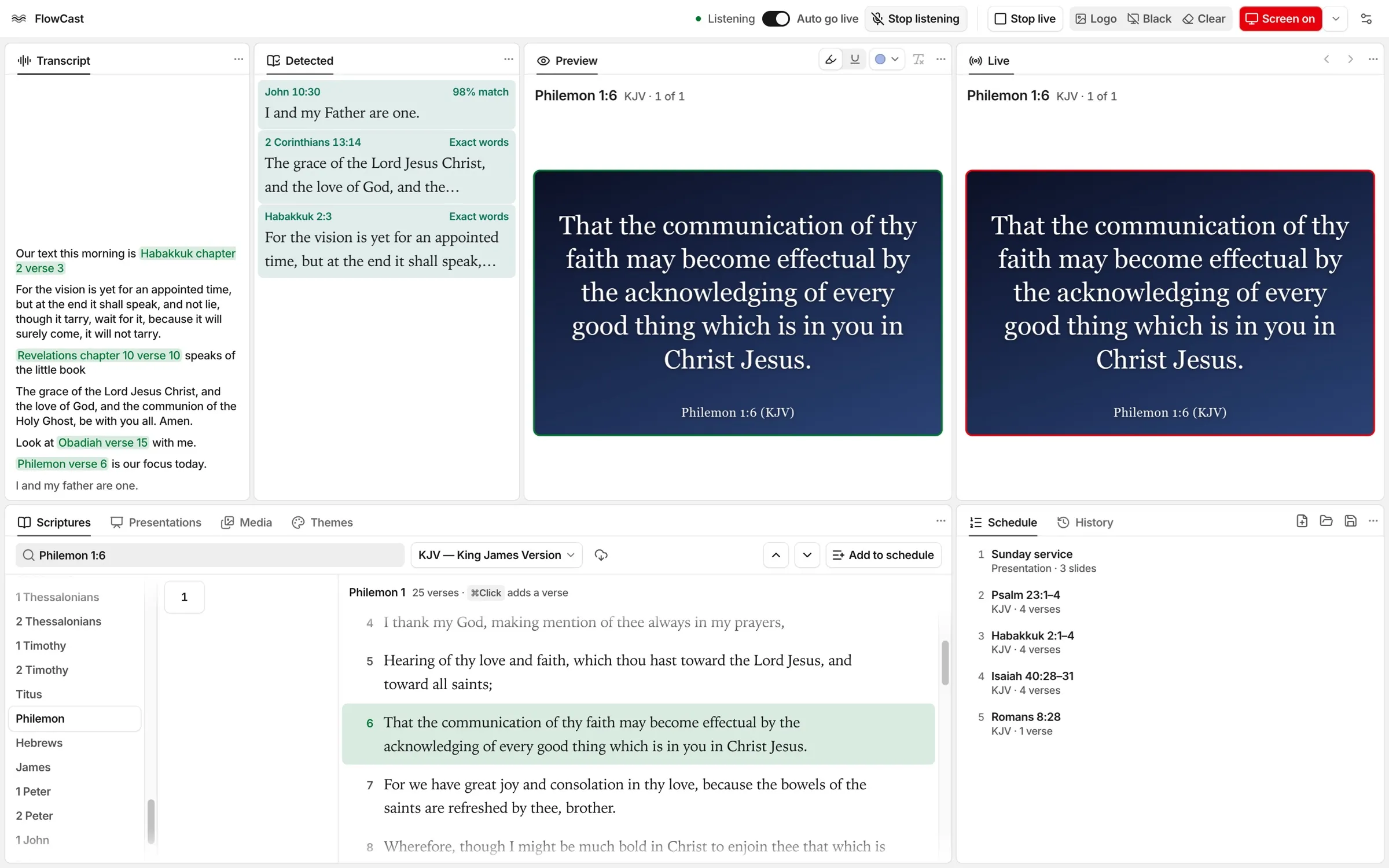
When a preacher names a verse, someone must find it and put it on the screen. FlowCast listens to the sermon and does that step. The media team can still choose what goes live.
Why FlowCast exists
A church should see the verse while the preacher reads it. FlowCast hears the reference, finds the verse, and sends it to the screen. It also finds verses that the preacher quotes or retells without a reference.
- English Bible versions included, ready offline
- 30
- From a spoken reference to the verse on the screen
- 10ms
- For a search by meaning, on the computer
- 50ms
- Versions that Detected compares with each sentence
- 6
What guides FlowCast
Runs on the computer
Speech recognition and verse search run on the computer. The Bible versions and the search models come with FlowCast and work offline.
The operator stays in control
Turn off Auto go live to keep named references off the screen. Detected verses go live only when you send them.
A familiar layout
The layout follows EasyWorship. You can move, float, and hide each panel, and save the layouts you use.
Open about usage data
FlowCast collects usage data, with transcripts and audio, to make its speech recognition better. Collection is on at first. You can turn it off, stop the upload, or export the data.
"The preacher says the reference. Less than a second later, the church can read the verse on the screen."